
Collect rent on time, every month
Rent Manager brings your properties, units, tenants, rent agreements, monthly bills, payments, deposits and repair requests into one simple system, with a mobile app for your tenants.
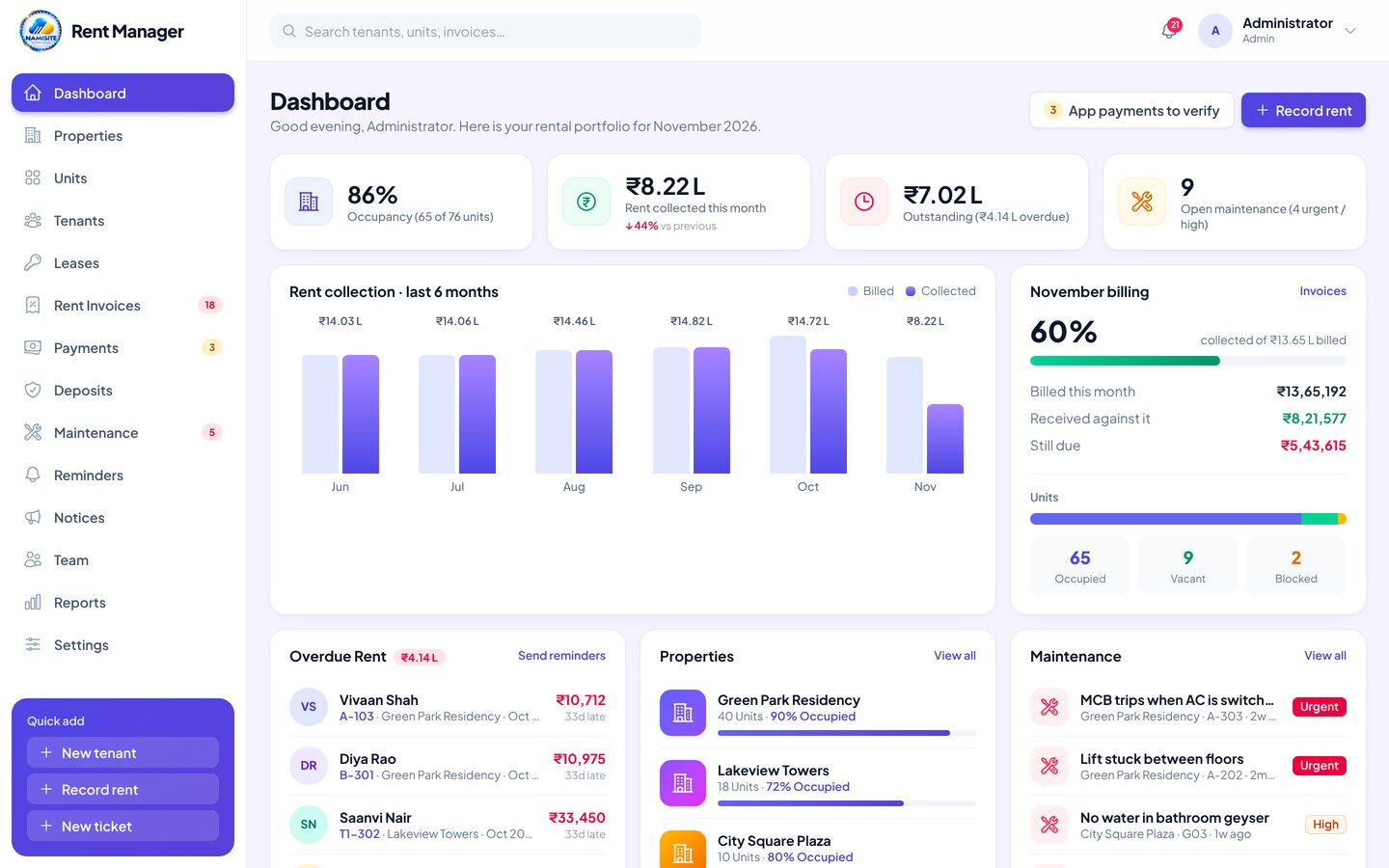
Every unit, tenant and rupee of rent in one place
Renting out property means many small jobs every month: making rent bills, chasing late payments, writing receipts, tracking deposits and fixing leaking taps. When these live in notebooks, spreadsheets and chat groups, rent comes in late and nobody knows who owes what.
Rent Manager connects them. Bills are created automatically, reminders go out on time, tenants pay and report payments from their phone, and every rupee gets a receipt.
- Unit map & occupancy
- Leases & deposits
- Bills, payments & receipts
- Repair requests
Built for how rentals really run
One building or fifty, flats or shops, Rent Manager fits the way you work.
Know who has paid, instantly
See every unit, every tenant and every rupee due on one dashboard, without keeping notebooks or spreadsheets.
Book a demoManage many buildings, one team
Handle properties for several owners, give each staff member the right access and track collections by property.
Book a demoShops, offices and beds too
Rent out shops, office space, warehouses or PG beds, with their own rent, maintenance and deposit terms.
Book a demoEverything your rental office needs
From letting out a unit to settling the deposit at move-out, every step is covered.
Properties
Buildings, houses, shops, offices and PGs with owner details and occupancy.
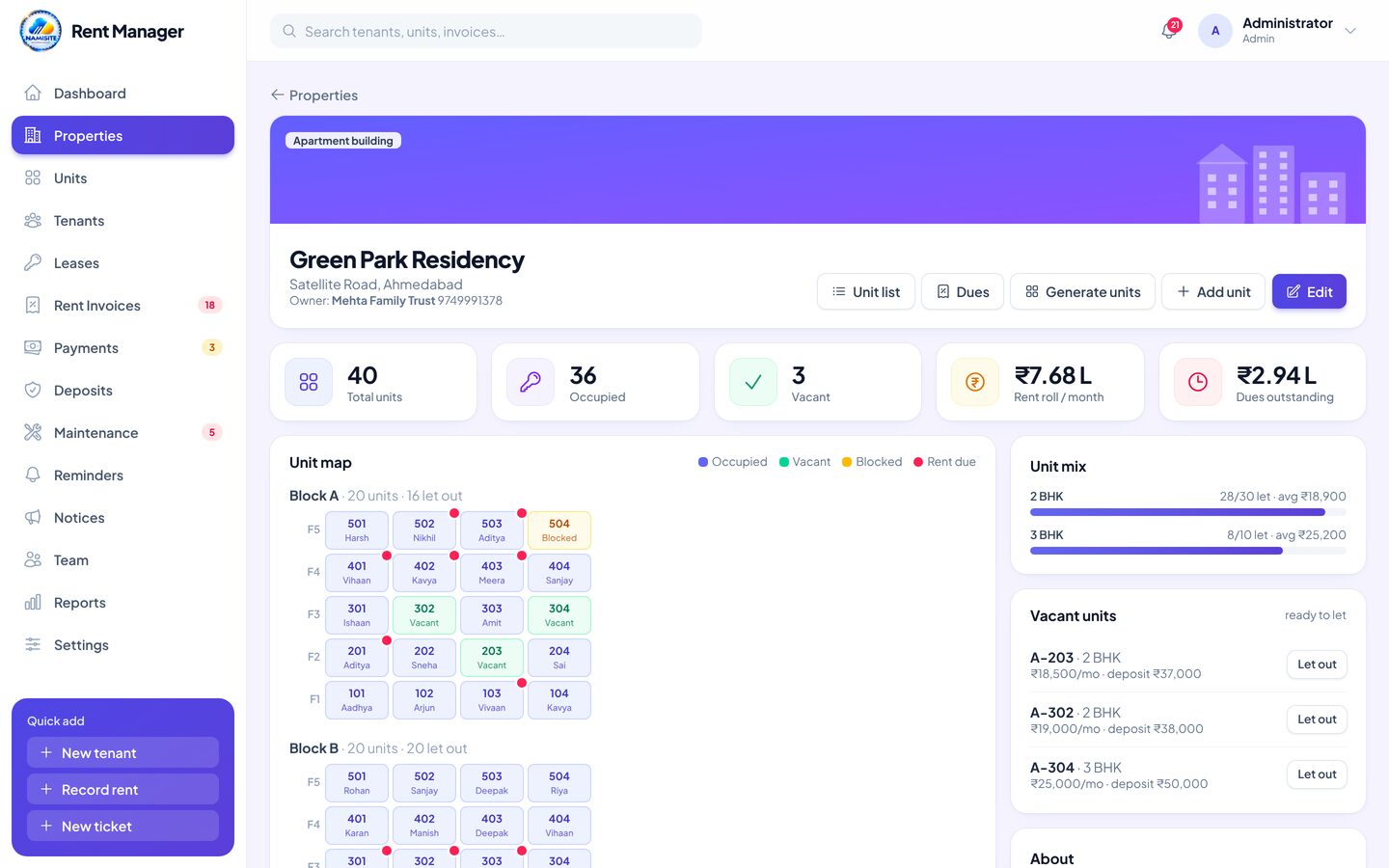
Unit map
Block and floor view: occupied, vacant, blocked and rent due at a glance.
Tenants
Profiles with ID proof, emergency contact, balance and full history.
Rent agreements
Term, billing day, yearly increase, notice period, lock-in and printable agreement.
Automatic rent bills
Monthly bills made for you, pro-rated first month and yearly increase applied.
Extra charges
Add electricity, water, parking or repair charges and late fees to any bill.
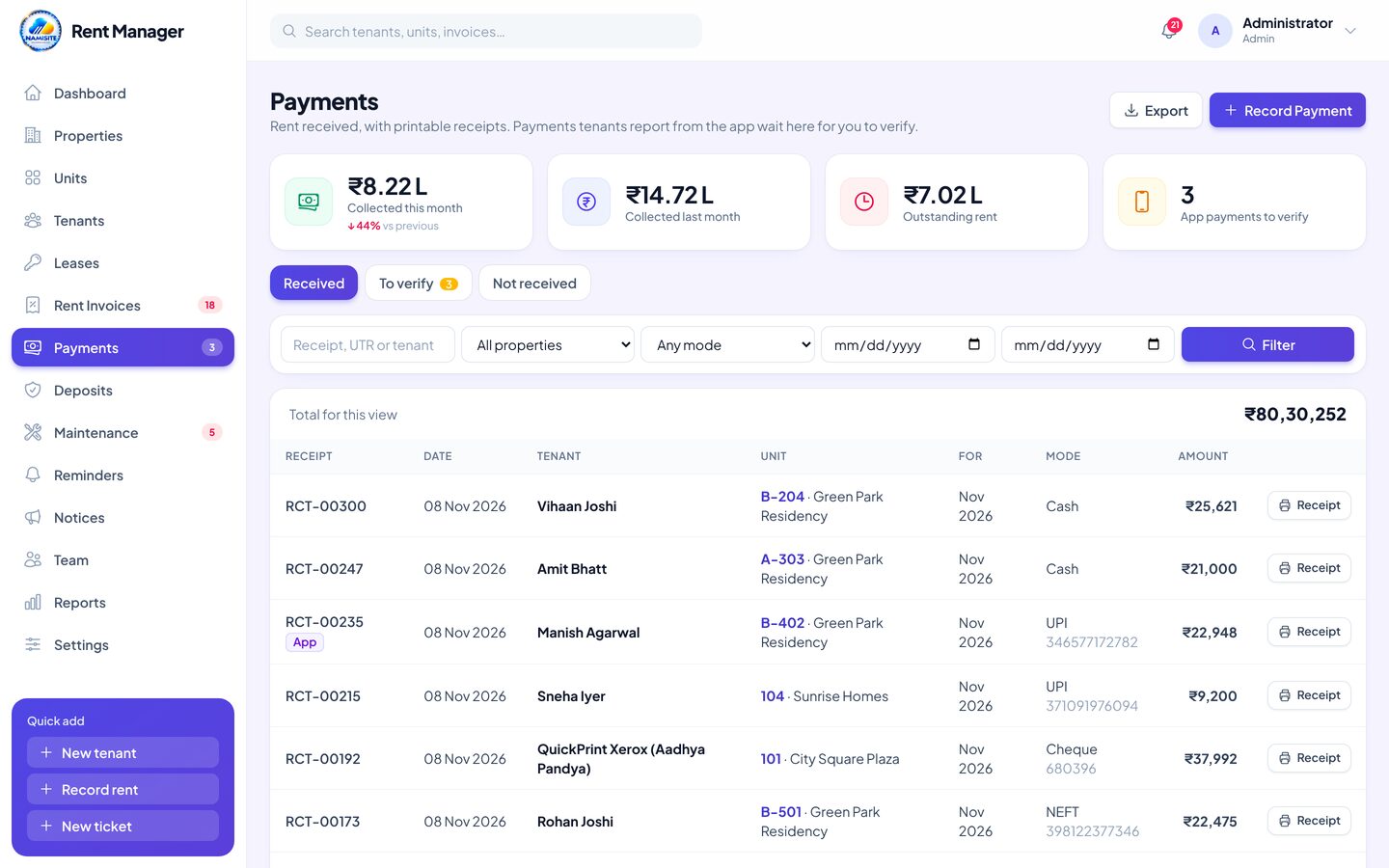
Payments & receipts
UPI, NEFT, cash or cheque with automatic receipt numbers and printable receipts.
Deposits & move-out
Deposit held per tenant, deductions and refund settled at move-out.
Maintenance
Repair tickets with priority, assigned staff, photos, cost and tenant rating.
Reminders
Email reminders before the due date and while overdue, plus ready WhatsApp messages.
Notices
Announcements for one building or everyone, shown in the tenant app.
Reports & exports
Collections, arrears ageing, occupancy, rent roll and deposits, to CSV.
From move-in to every month's receipt
One connected flow, so your office and your tenants always see the same numbers.
Give tenants an app, get fewer calls
Tenants sign in with a code sent to their email. They see what they owe, pay by UPI, raise repair requests and get receipts, all from their phone.
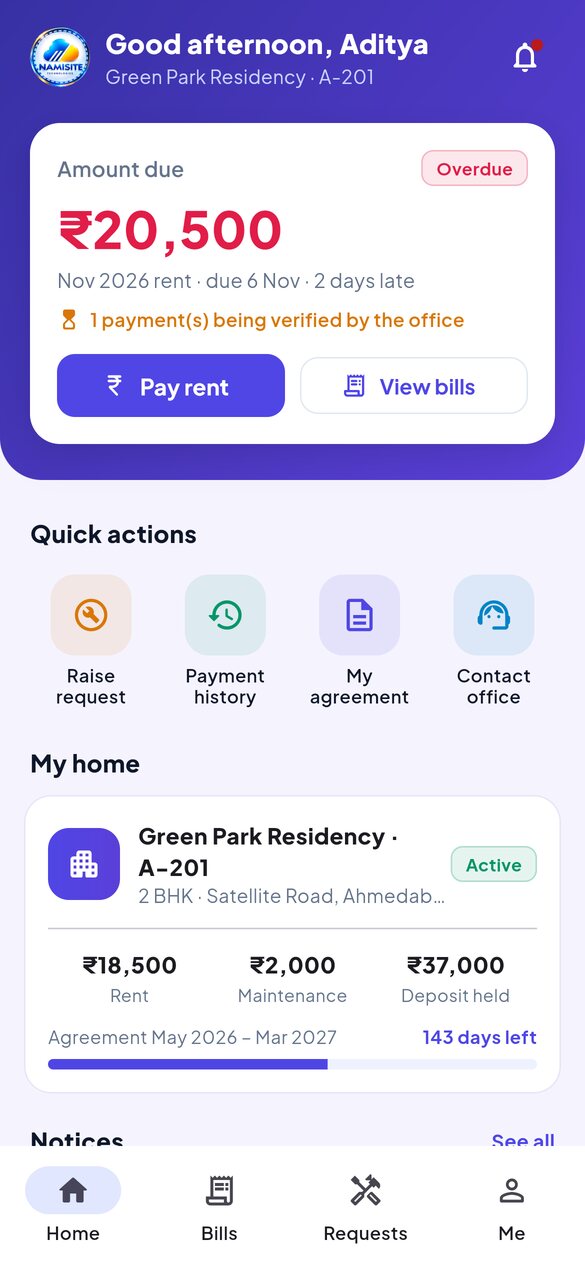
Home at a glanceAmount due with overdue warning, their flat or shop, rent, deposit held, days left on the agreement and the latest notices.
See the admin panel in action
Real screens from Rent Manager. Pick a module to take a look.
Your rentals at a glance
Owners and managers see the whole picture the moment they log in.
- Occupancy, rent collected and outstanding
- Billed vs collected for the last 6 months
- Overdue tenants with one-click reminders
- Open repairs and leases ending soon
Every building on one screen
Total, occupied and vacant units with rent roll and dues for each property.
- Block and floor-wise unit map
- Rent due shown right on the map
- Vacant units ready to let out
- Add a whole block of units in one go
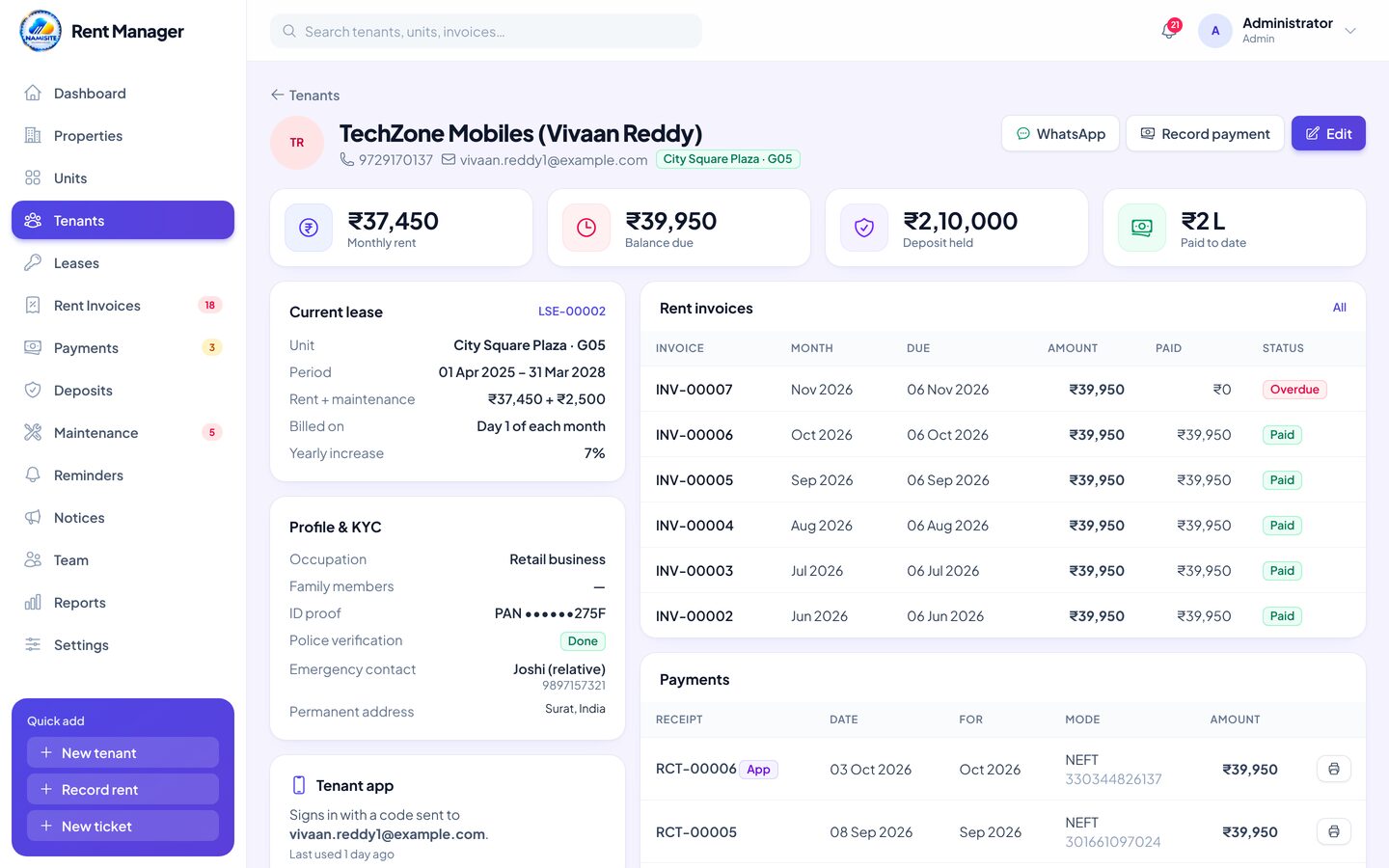
Know every tenant
Contact details, ID proof, emergency contact and their complete record.
- Balance due and payment history
- Current and past leases
- Repair requests they raised
- App access on or off, WhatsApp in one tap
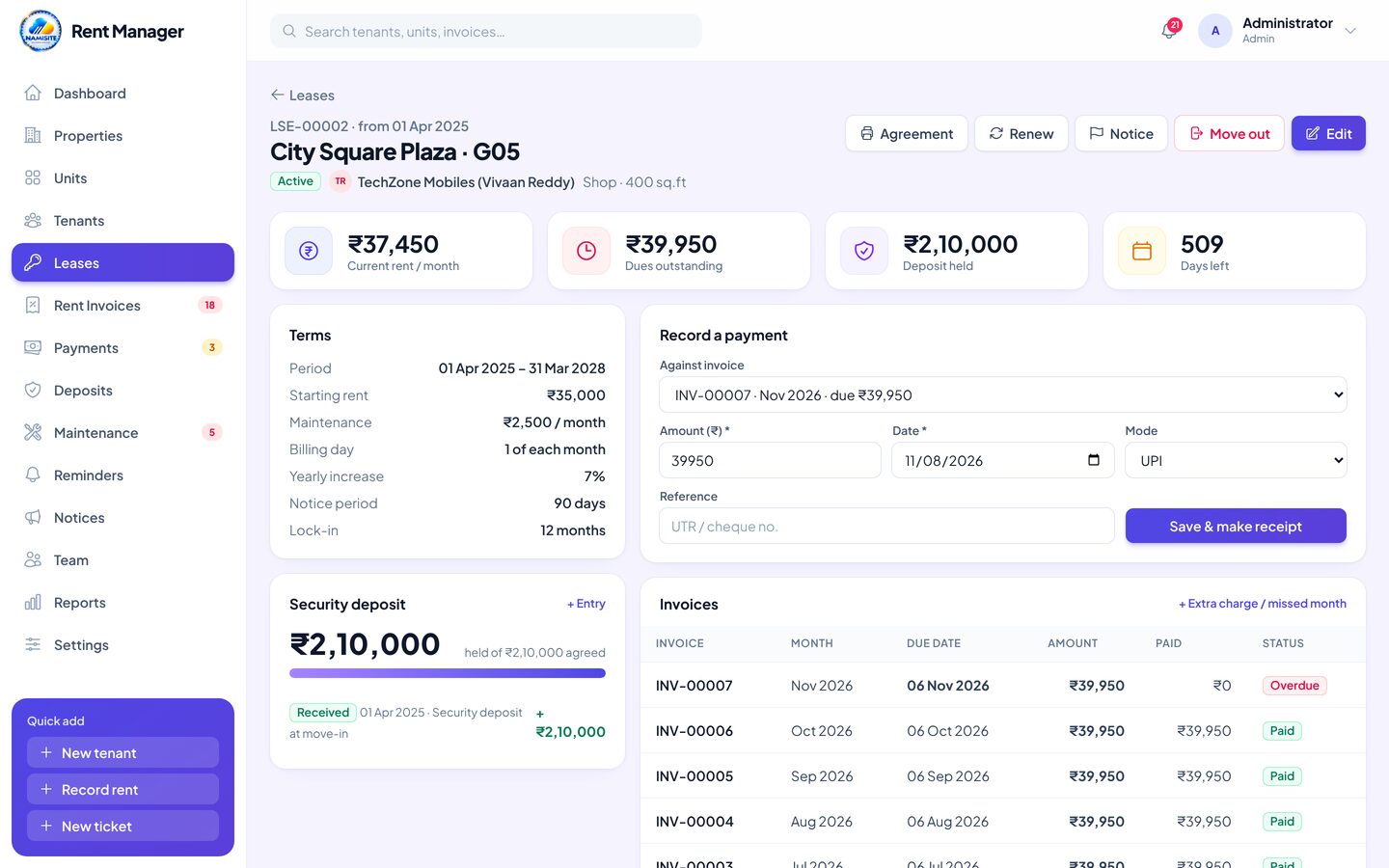
Rent agreements, organised
Every lease with its rent, term and deposit, and what is due right now.
- Yearly rent increase applied automatically
- Record payments straight from the lease
- Notice, renewal and printable agreement
- Move-out with deposit settlement
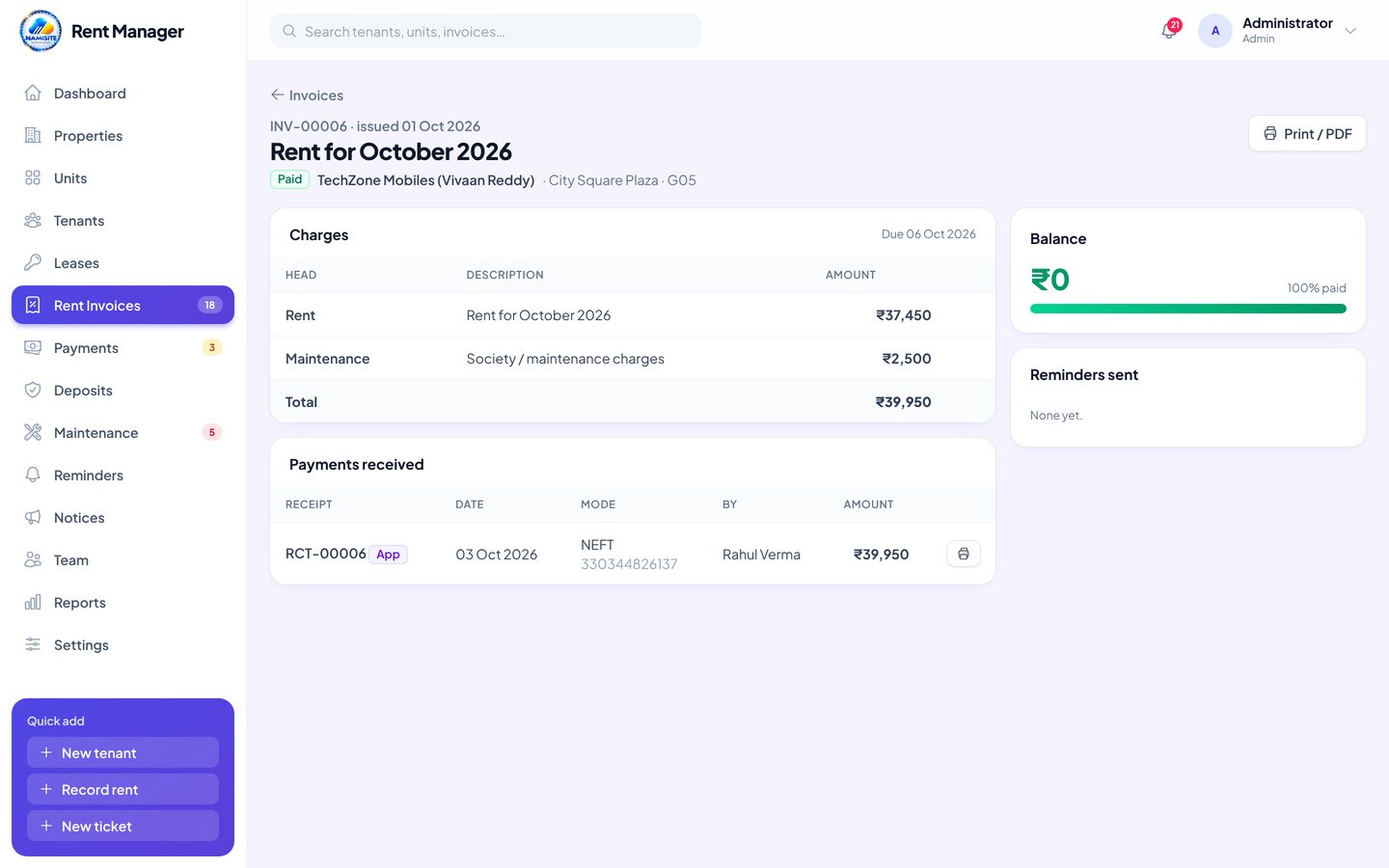
Bills that make themselves
Each month's rent bill is created on its own, with the right amount every time.
- Rent plus maintenance, pro-rated when needed
- Add electricity, water or parking charges
- Late fee applied once when overdue
- Print, Save as PDF or share a link
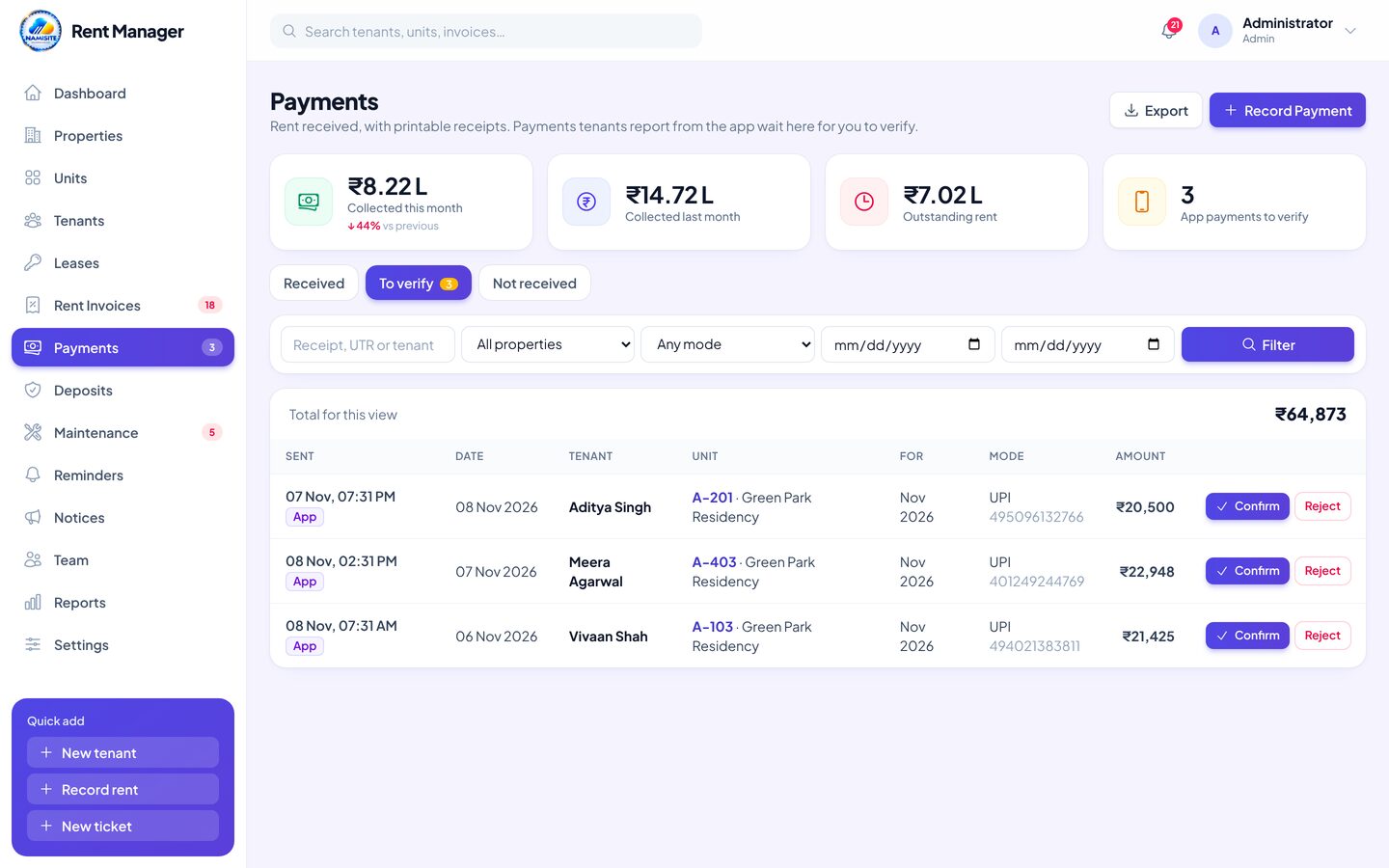
Every rupee with a receipt
Record rent in seconds and confirm payments tenants send from the app.
- UPI, NEFT, IMPS, cheque, cash and card
- "To verify" list for payments from the app
- Automatic receipt numbers
- Printable receipt and share link
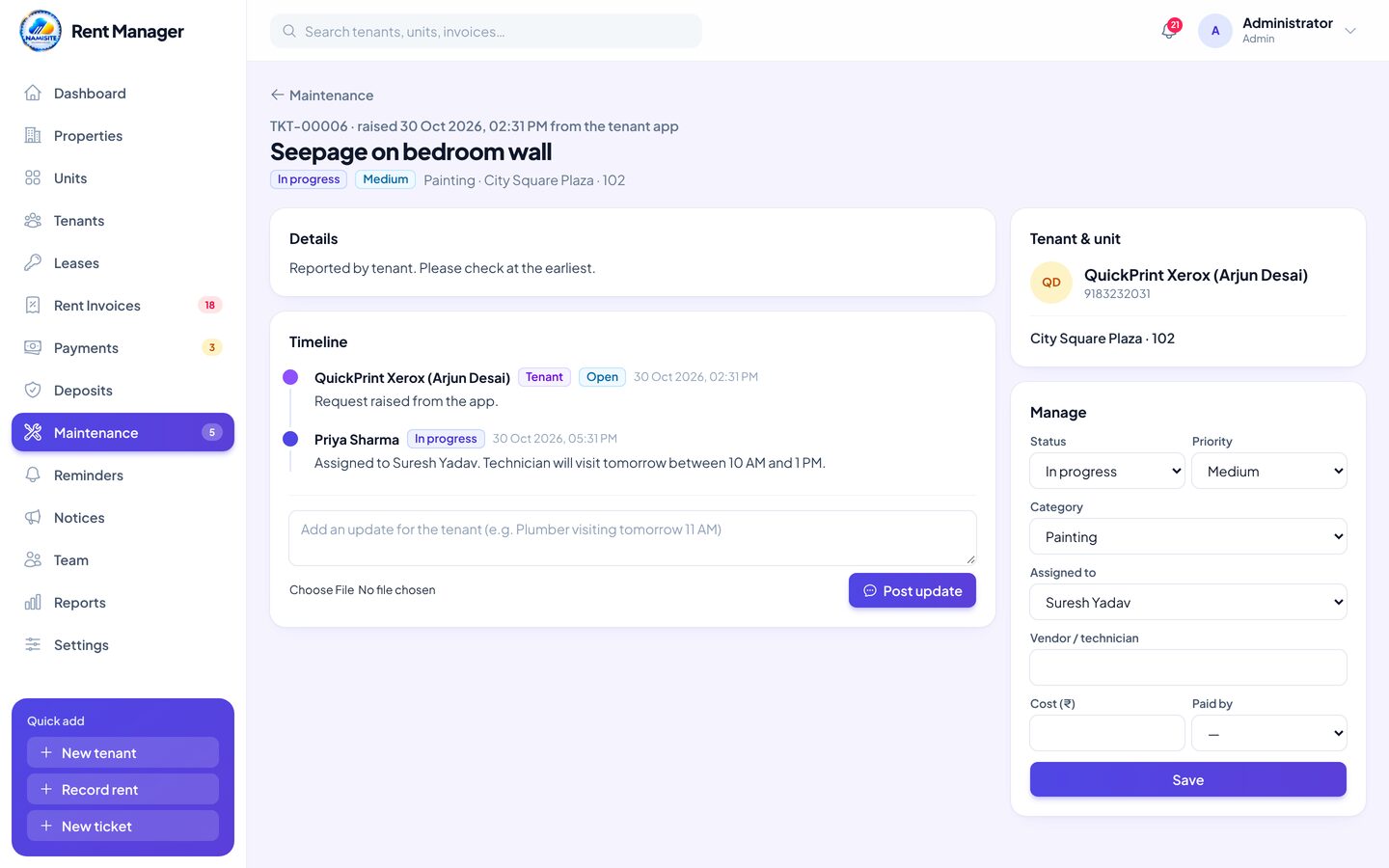
Repairs, tracked to the end
Requests from the office or the app land in one list for your team.
- Category, priority and assigned staff
- Status updates with photos
- Vendor, cost and who pays
- Tenant rating after the job
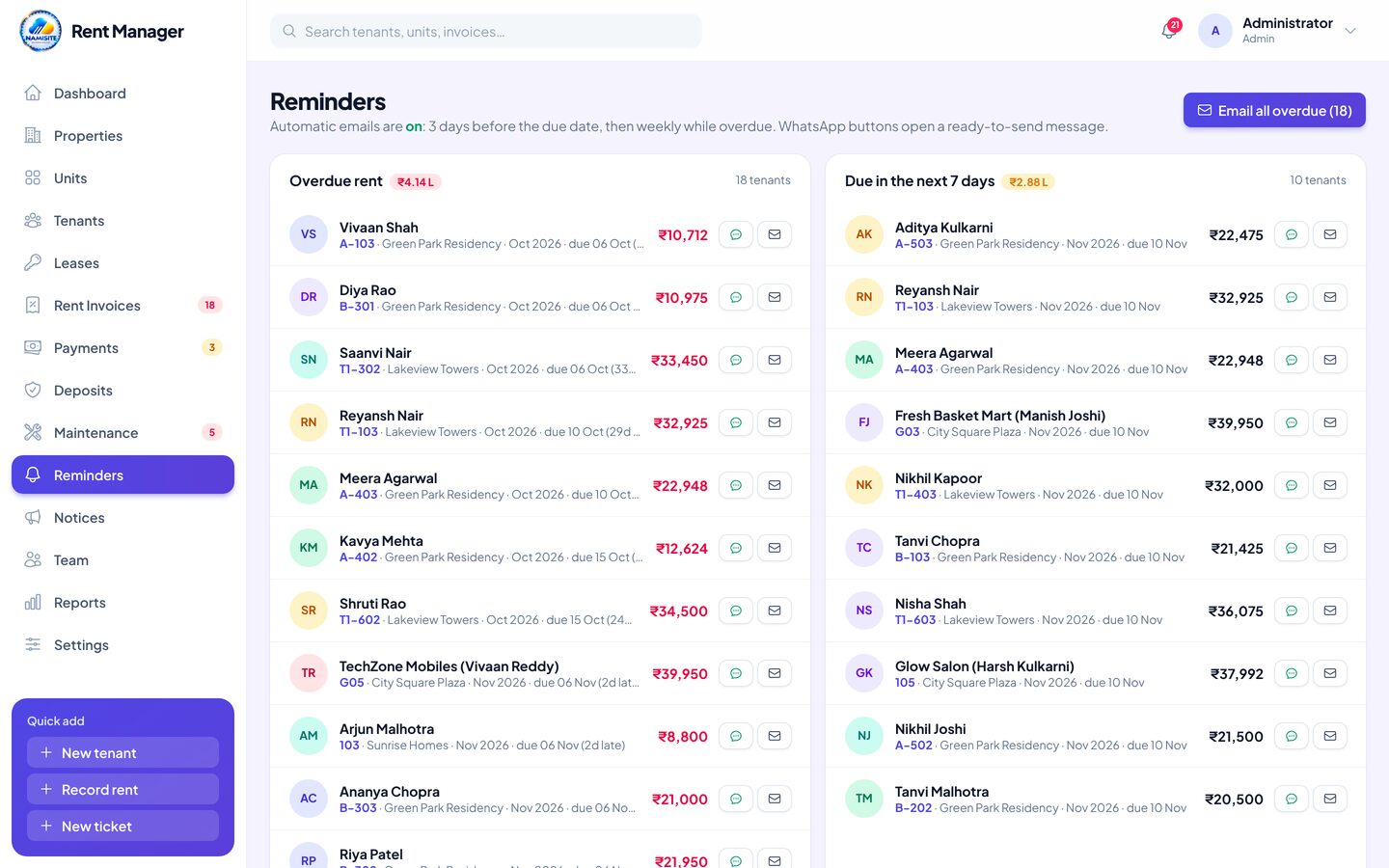
Polite reminders, on time
Stop chasing tenants one by one.
- Due-soon and overdue lists
- Email reminders, one by one or all at once
- Ready WhatsApp message for each tenant
- Log of every reminder sent
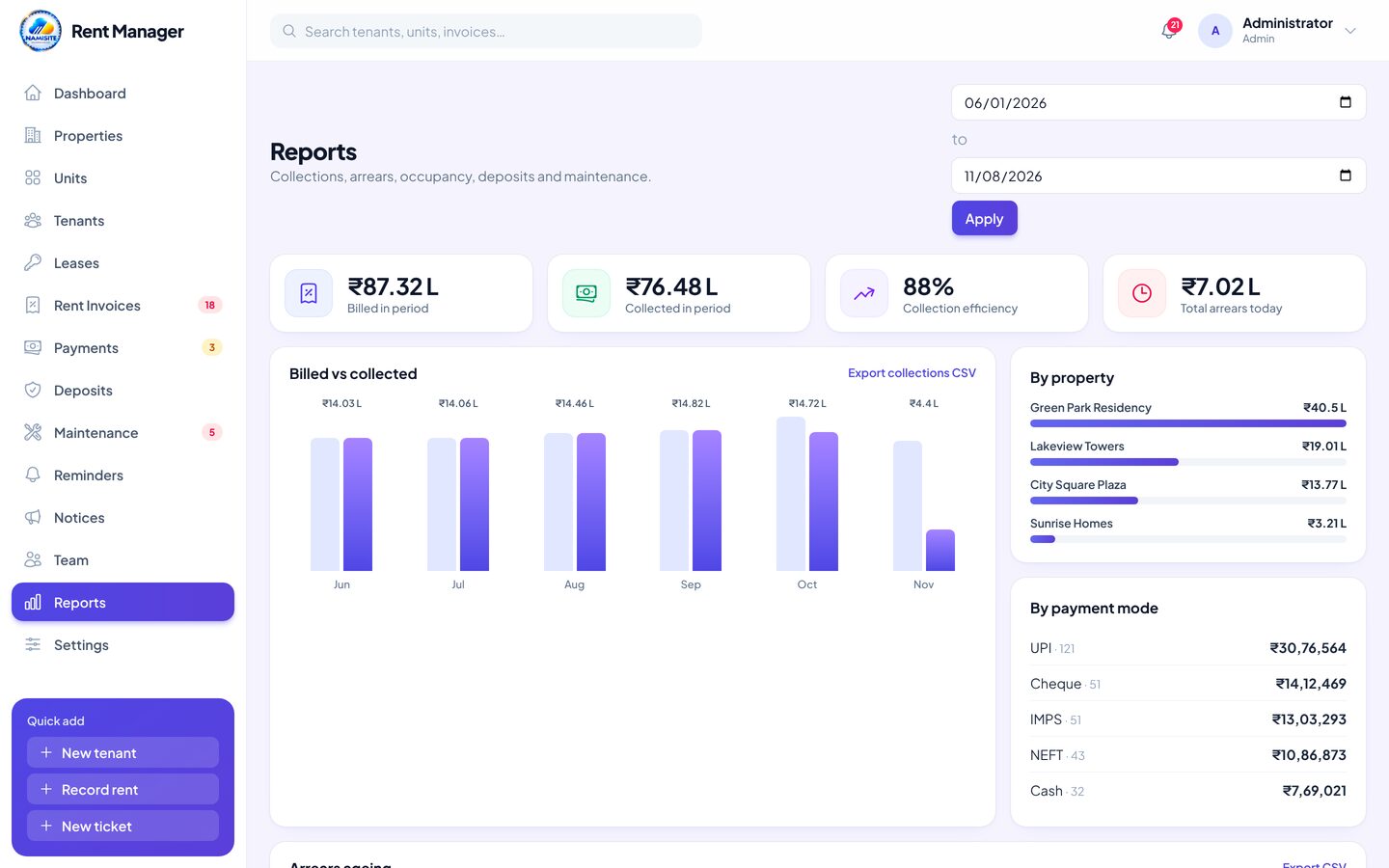
Numbers owners ask for
Clear reports, without spreadsheet work.
- Billed vs collected by month
- Collections by property and payment mode
- Arrears ageing, occupancy and rent roll
- Export to CSV
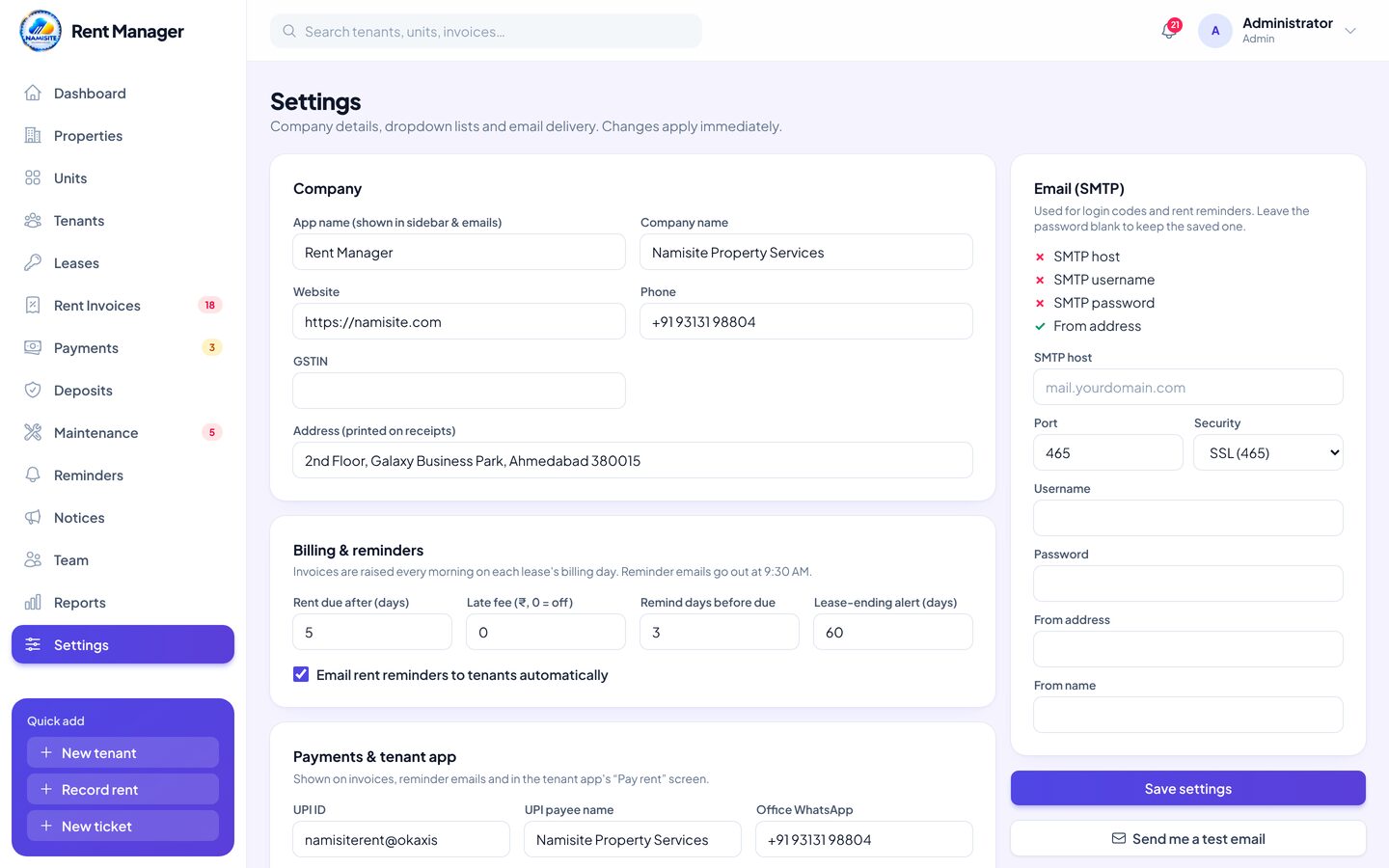
An admin panel you control
Set up Rent Manager the way your office works, without a developer.
- Due days, late fee and reminder timing
- UPI ID and bank details shown in the app
- Default lease terms and dropdown lists
- Your own email (SMTP) settings
Notebooks and chat groups cost you rent
Without Rent Manager
- Bills are written by hand every month
- Nobody is sure who has paid and who hasn't
- Rent increases are forgotten at renewal
- Tenants call the office for every small thing
- Deposit records are spread across files
- Owners wait days for a collection report
With Rent Manager
- Bills are created automatically on time
- Dues and overdue tenants on the dashboard
- Yearly increase applied from the agreement
- Tenants check bills and raise requests in the app
- Deposits tracked from move-in to refund
- Reports ready any time, one click to export
Rent Manager vs the old way
How a rental management system compares with spreadsheets and a general accounting tool.
| Feature | Rent Manager | Spreadsheets | Accounting app |
|---|---|---|---|
| Automatic monthly rent bills | ✓ | ✕ | Setup needed |
| Unit map with occupancy | ✓ | ✕ | ✕ |
| Leases with yearly rent increase | ✓ | Manual | ✕ |
| Rent reminders (email + WhatsApp text) | ✓ | ✕ | Partial |
| Mobile app for tenants | ✓ | ✕ | ✕ |
| Payments with printable receipts | ✓ | Manual | ✓ |
| Payments reported by tenants, verified by office | ✓ | ✕ | ✕ |
| Security deposits & move-out settlement | ✓ | Manual | ✕ |
| Maintenance requests with photos | ✓ | ✕ | ✕ |
| Notices to tenants | ✓ | ✕ | ✕ |
| Late fee & extra charges | ✓ | Manual | ✓ |
| Role-based access (5 roles) | ✓ | ✕ | Varies |
| Password-free OTP login | ✓ | ✕ | Varies |
| Arrears, occupancy & collection reports | ✓ | Manual | Partial |
The right access for every person
Five built-in staff roles. Everyone sees what they need, and only that.
Owner / Admin
Full control of the business.
- Everything in Rent Manager
- Manage users & roles
- Settings, UPI & bank details
- Reports & exports
Property Manager
Runs properties day to day.
- Properties, units & tenants
- Leases, bills & payments
- Maintenance & reports
- Users & settings
Accounts
Looks after the money.
- Bills & extra charges
- Payments & receipts
- Deposits & reports
- Users & settings
Maintenance Staff
Fixes what tenants report.
- Tickets assigned to them
- Status updates & photos
- Money & reports
- Users & settings
Viewer
Read-only for owners or partners.
- View dashboards & data
- View reports
- Edit anything
- Users & settings
See Rent Manager with your own properties
A free, no-pressure walkthrough of the admin panel and the tenant app.
Live in days, not months
A simple four-step setup, with the NAMISITE team helping you at every step.
Questions, answered
What is Rent Manager?
It is software for renting out property. It keeps your properties, units, tenants, rent agreements, monthly bills, payments, deposits and repair requests in one place, and gives your tenants a mobile app.
Who is it for?
Landlords, property owners, property management companies, and owners of commercial complexes, shops, offices, PGs and hostels.
Are rent bills really created automatically?
Yes. Every day Rent Manager checks the running leases and creates that month's bill on the billing day, with rent and maintenance. The first and last months are pro-rated and the yearly increase from the agreement is applied. You can add extra charges to any bill.
How do tenants pay?
From the app, tenants open any UPI app with your UPI ID and the amount filled in, or pay to your bank account. They then send the UTR number and an optional screenshot. Your office confirms it and the receipt appears in the app. You can also record cash or cheque payments in the admin panel.
Does the tenant app work on Android and iPhone?
Yes. The app is built for Android and iOS, and tenants can also use it in any browser at myrenter.namisite.com/renter. Tenants sign in with a one-time code sent to their email, and you can switch a tenant's app access on or off.
Can I manage many properties?
Yes. Add as many properties as you need, each with its own blocks, floors, units, tenants and reports.
Can I control what each person sees?
Yes. Choose from Admin, Property Manager, Accounts, Maintenance Staff and Viewer roles. Only admins manage users and settings.
Can I export my data?
Yes. Tenants, payments and reports export to CSV, and every bill and payment can be printed or saved as PDF.
How do I get started?
Schedule a free demo using the form on this page, WhatsApp us on +91 93131 98804 or email support@namisite.com. The NAMISITE team will help you set up your properties, tenants and users.
Ready to collect rent on time?
Move your rentals off notebooks and spreadsheets and into one system your office and tenants can use.